Webhooks Guide
Register webhook endpoints, verify signatures, and receive EasyRoutes events.
EasyRoutes webhooks allow you to receive events programmatically in response to changes in your routes, stops, drivers, and imported stops. In combination with using the EasyRoutes API, webhook events allow you to build powerful automation triggered by deliveries, route updates, or other events.
What you'll need:
- An active EasyRoutes paid plan and API credentials (see Getting Started Guide)
- A server with an HTTPS endpoint that can receive POST requests
- Familiarity with HMAC signature verification (optional but recommended)
Common use cases
| Goal | Subscribe to |
|---|---|
| Update your system when a delivery completes | STOP_STATUS_UPDATED |
| Sync proof of delivery photos to your system | STOP_UPDATED |
| Know when a driver starts their route | ROUTE_STARTED |
| Track when routes are dispatched | ROUTE_DISPATCHED |
| Sync imported stops back to your source system | IMPORTED_STOP_CREATED, IMPORTED_STOP_UPDATED |
Prefer no-code? Set up Zaps based on route- and stop-level updates using our Route Updated & Stop Status Updated Zapier triggers, which interface directly with our Webhooks API. Check out some common Zapier Integrations.
Register a webhook endpoint
You can register webhook endpoints in EasyRoutes Settings or through the API.
Register in Settings
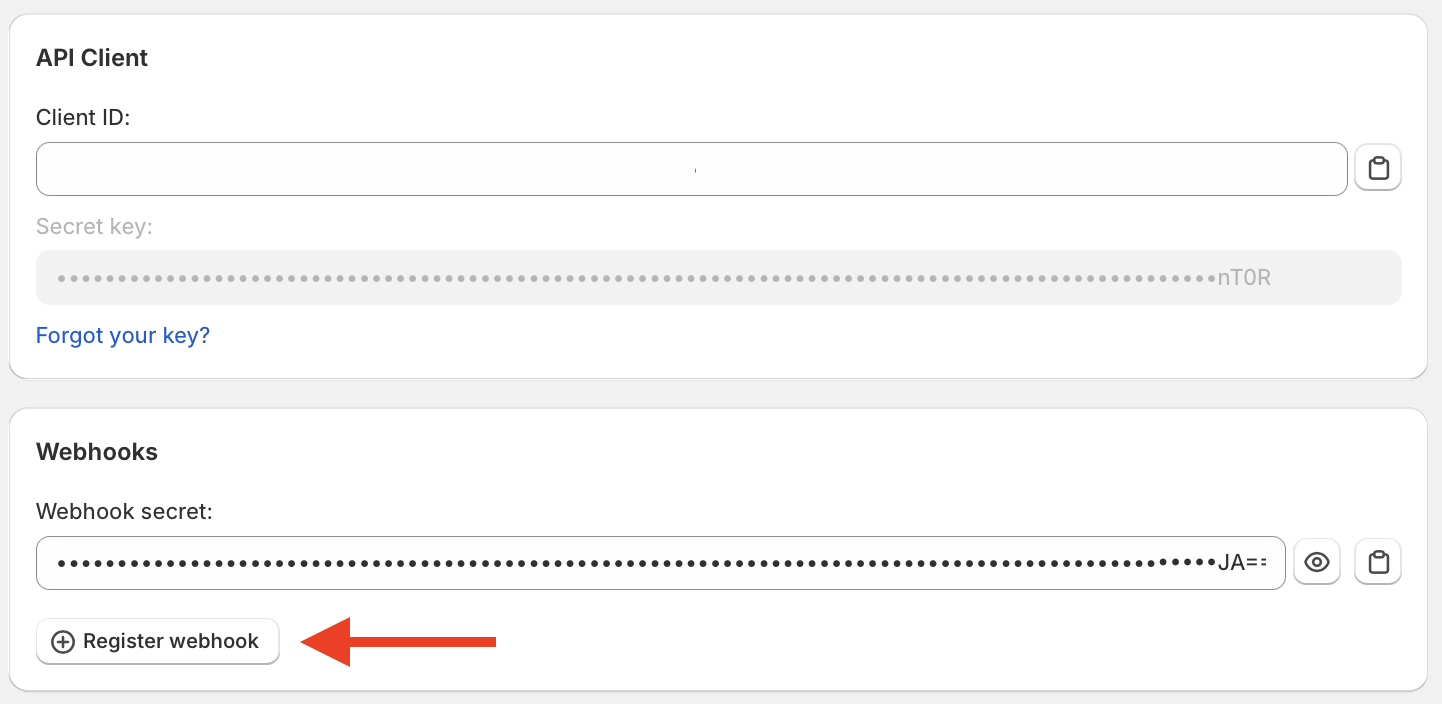
Go to EasyRoutes Settings > API and click Register webhook.
Configure:
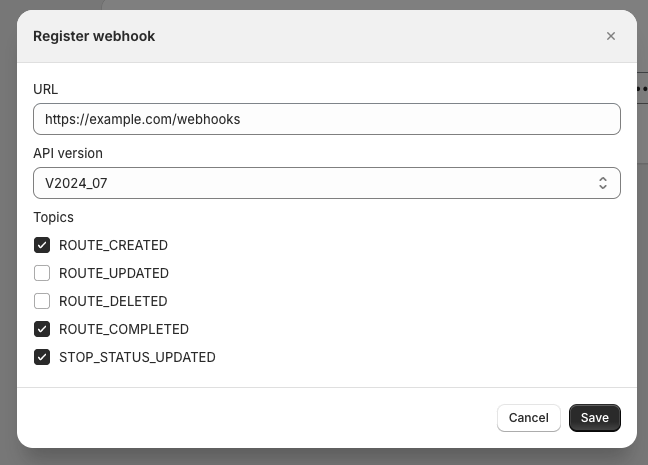
- URL: Your HTTPS endpoint (e.g.,
https://yourserver.com/webhooks/easyroutes) - API version: Determines the payload format
- Topics: Which events to receive (see Webhook topics below)
Creating your first webhook generates a Webhook secret — you'll use this to verify requests are from EasyRoutes. See Verifying webhook requests for details on how to secure your endpoint.
Register with the API
After authenticating, send a POST request to /webhooks with your public HTTPS URL and the topics to receive:
curl -X POST \
  -H "Authorization: Bearer YOUR_ACCESS_TOKEN" \
  -H "Content-Type: application/json" \
  -d '{
    "url": "https://yourserver.com/webhooks/easyroutes",
    "topics": ["STOP_STATUS_UPDATED", "ROUTE_DISPATCHED"]
  }' \
  https://easyroutes.roundtrip.ai/api/2024-07/webhooks
The response contains the subscription ID, URL, selected topics, and whether the subscription is active. Use GET /webhooks to list subscriptions and DELETE /webhooks/{id} to remove one. Your webhook secret remains available in EasyRoutes Settings > API and is distinct from your API secret key.
Build a webhook handler
To receive webhooks, you need to:
- Accept
POSTwebhook requests on an HTTPS endpoint or server- Relevant webhook metadata like the topic and affected object ID are sent via headers as well as in the JSON body of the request.
- The affected object is sent in the
payloadfield of the body. Its type depends on the topic:Routefor route and route-stop events,Driverfor driver events, andImportedStopfor imported-stop events. TheTESTtopic has no payload. - See Webhook event overview below for details on the request format.
- Return a successful status code (
2xx) to acknowledge the webhook quickly (within 10 seconds).- Avoid doing any complex logic that could cause a timeout synchronously in your endpoint handler.
- (Recommended) Verify the HMAC signature — see below.
Webhook event overview
All EasyRoutes webhook requests share a set of common fields, regardless of API version. These fields are serialized in a JSON payload in the body of the POST request.
| Field | Description | Example |
|---|---|---|
eventId | The unique ID of the webhook event. In rare cases of duplicate webhook delivery, this can be used to deduplicate work. | "evt-fa75b82d-2411-4cf8-b15f-cf3d8c91e919" |
topic | Topic of the webhook. See Webhook topics for a list of supported topics. | "ROUTE_UPDATED" |
eventTimestamp | The timestamp of the event that triggered the webhook. | "2024-08-23T16:12:26-04:00" |
apiVersion | The API version of the payload object. | "V2024_07" |
shopifyShop (optional) | The Shopify shop connected to EasyRoutes (Shopify only) | "easyroutes.myshopify.com" |
organization (optional) | The unique organization identifier for EasyRoutes for Web | "roundabout-supply-co-a5c2" |
objectId (optional) | The ID of the affected object. For route-stop events, this is the route-stop ID even though payload is the containing Route. | "rst-6ffc8a79-e556-4ca4-9246-33850da3cedc" |
user | User that triggered the event. The field is structured and different fields are populated for different update scenarios. For EasyRoutes in Shopify, this corresponds to the shopifyUserId of the Shopify admin user for your store that took the action. For EasyRoutes for Web users, this corresponds to the email of the authenticated member who made the update. For driver-initiated actions, the driverId is populated with the driver's ID (matching the API format). All kinds of webhooks may also include an ipAddress and userAgent of the initiating user (if available). | EasyRoutes for Shopify update: {"shopifyUserId": "96343753011"} EasyRoutes for Web update: {"email":"john.doe@roundtrip.ai"} Driver update: {"driverId":"drv-cb93e344-fb1d-4d34-b8a8-8df5cdd9e939"} Example with IP address and user agent: {"ipAddress": "37.19.211.58", "userAgent": "Mozilla/5.0 (Macintosh; Intel Mac OS X 10_15_7) AppleWebKit/537.36 (KHTML, like Gecko) Chrome/135.0.0.0 Safari/537.36"} |
payload (optional) | The affected object. It is a Route for route and route-stop topics, a Driver for driver topics, and an ImportedStop for imported-stop topics. The TEST topic has no payload. | {"id":"rte-...", "name":"#878", "start":{...}, ...} |
Sample:
{
  "eventId": "evt-fa75b82d-2411-4cf8-b15f-cf3d8c91e919",
  "topic": "STOP_STATUS_UPDATED",
  "eventTimestamp": "2024-08-23T16:12:26-04:00",
  "apiVersion": "V2024_07",
  "objectId": "rst-abc123",
  "payload": {
    "id": "rte-6ffc8a79-e556-4ca4-9246-33850da3cedc",
    "name": "Monday AM Route",
    "stops": [...]
  }
}
Additionally, some of the metadata fields are mirrored in HTTP headers for convenience.
X-EasyRoutes-Event-IdX-EasyRoutes-TopicX-EasyRoutes-Event-TimestampX-EasyRoutes-VersionX-EasyRoutes-Shopify-ShopX-EasyRoutes-OrganizationX-EasyRoutes-Object-Id
Verifying webhook requests
EasyRoutes webhooks are signed using your unique Webhook secret from Settings. The HMAC SHA256 hash is sent in the webhook request via the X-EasyRoutes-Hmac-Sha256 header. To verify that requests are sent by EasyRoutes, compute your own signature from the request body and verify it against the header signature.
Note: your webhook secret is distinct from your API secret key and is always available on the Settings page.
Example webhook endpoint
Here is an example endpoint implemented in Go:
package main

import (
  "crypto/hmac"
  "crypto/sha256"
  "encoding/base64"
  "encoding/json"
  "io"
  "log"
  "net/http"
)

// Webhook secret key example.
// Not recommended to hardcode!
const easyroutesSecret = "PjV...w=="

type Event struct {
  EventId        string `json:"eventId"`
  Topic          string `json:"topic"`
  EventTimestamp string `json:"eventTimestamp"`
  ApiVersion     string `json:"apiVersion"`
  ObjectId       string `json:"objectId,omitempty"`
  Payload        []byte `json:"payload,omitempty"`
}

func main() {
  http.HandleFunc("/webhook", func(w http.ResponseWriter, r *http.Request) {
    b, err := io.ReadAll(r.Body)
    if err != nil {
      log.Printf("error reading webhook body: %v", err)
      w.WriteHeader(http.StatusServiceUnavailable)
      return
    }

    sig := r.Header.Get("X-EasyRoutes-Hmac-Sha256")
    if len(sig) == 0 {
      log.Printf("missing signature header")
      w.WriteHeader(http.StatusBadRequest)
      return
    }

    d, err := base64.StdEncoding.DecodeString(easyroutesSecret)
    if err != nil {
      log.Fatalf("error decoding secret: %v", err)
    }

    enc := hmac.New(sha256.New, d)
    enc.Write(b)
    expected := enc.Sum(nil)
    actual, err := base64.StdEncoding.DecodeString(sig)
    if err != nil {
      log.Printf("error decoding signature: %v", err)
      w.WriteHeader(http.StatusBadRequest)
      return
    }

    if !hmac.Equal(expected, actual) {
      log.Printf(
        "signature mismatch, expected=%s, actual=%s",
        base64.StdEncoding.EncodeToString(expected),
        base64.StdEncoding.EncodeToString(actual),
      )
      w.WriteHeader(http.StatusBadRequest)
      return
    }

    parsed := &Event{}
    err = json.Unmarshal(b, parsed)
    if err != nil {
      log.Printf("error parsing webhook body: %v", err)
      w.WriteHeader(http.StatusBadRequest)
      return
    }

    switch parsed.Topic {
    case "ROUTE_CREATED":
      // process event here
    }

    w.WriteHeader(http.StatusOK)
  })

  http.ListenAndServe(":8080", nil)
}
Testing your webhook
Once you've built your webhook endpoint and registered it in EasyRoutes, you can send a test event (topic = TEST) to verify everything is working as expected.
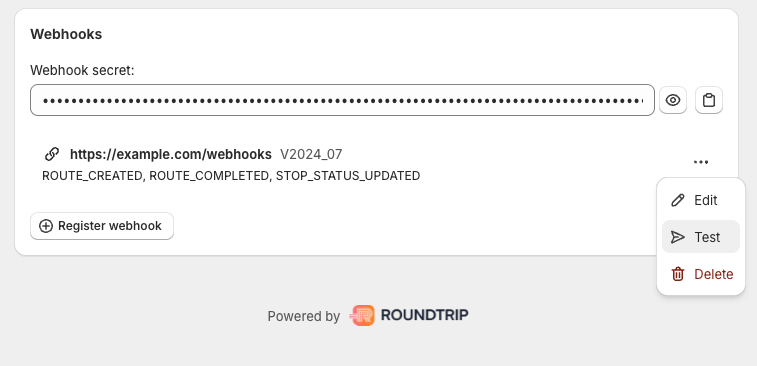
If your endpoint returns 2xx, you're ready.
Webhook topics
| Topic | Description | Payload type |
|---|---|---|
TEST | Test topic generated when testing webhooks from settings. | none |
ROUTE_CREATED | New route created. | Route |
ROUTE_UPDATED | Route updated by planner (i.e. stop order changed, start time, etc) | Route |
ROUTE_DELETED | Route deleted. | Route (deleted) |
ROUTE_DISPATCHED | Route dispatched to a specific driver or available to claim. | Route |
ROUTE_STARTED | Route started by driver. | Route |
ROUTE_COMPLETED | Route completed by driver. For a route that ends at the last stop, this is triggered when all stops are complete (attempted or delivered). For a route with an explicit end stop, this is triggered when the route is marked complete. | Route |
ROUTE_START_STOP_UPDATED | The start stop on the route was updated. This may correspond to the driver completing tasks or entering input on the start task. | Route |
ROUTE_END_STOP_UPDATED | The end stop on the route was updated. This may correspond to the driver completing tasks or entering input on the end task. | Route |
STOP_UPDATED | An individual route stop was updated. This includes:
| Route |
STOP_STATUS_UPDATED | An individual route stop status has changed. Individual stops trigger this event as their status is updated during delivery (i.e. out for delivery, attempted, delivered, etc.). Break stops will also trigger this event when completed. The entire Route is returned in the payload for convenience, while the objectId field and X-EasyRoutes-Object-Id header indicate which stop was updated. This will trigger for all stops when the route is marked as ready. Note: STOP_UPDATED includes all of the above as well, so clients should subscribe to one or the other but not both. | Route |
DRIVER_ADDED | Driver added to shop. Note that this event fires after an invited driver completes sign-up through the driver app. There are no events for pending drivers or invites themselves. | Driver |
DRIVER_UPDATED | Driver profile updated. | Driver |
DRIVER_ACTIVATED | Driver activated. | Driver |
DRIVER_DEACTIVATED | Driver deactivated. | Driver |
DRIVER_ARCHIVED | Driver is archived. | Driver (archived) |
IMPORTED_STOP_CREATED | A new stop was imported via API. | ImportedStop |
IMPORTED_STOP_UPDATED | A stop imported via API was updated. | ImportedStop |
IMPORTED_STOP_DELETED | A stop imported via API was deleted. | ImportedStop (deleted) |
Guidelines and best practices
The following section outlines some guidelines and best practices to be aware of when designing your EasyRoutes webhook handler.
Respond in a timely manner
Your handler should respond to a webhook request with a 2xx response within 10 seconds. If you take longer than that to respond, EasyRoutes may consider the delivery a failure. Failed webhooks are retried up to 10 times with exponential back-off for up to ~5 hours but are eventually dropped. Webhook endpoints that consistently fail may be deactivated (see below).
To respond quickly, avoid doing any heavy processing synchronously or making expensive downstream network calls to storage or other services. Consider setting up a queue to process webhook events asynchronously after responding immediately.
Handle duplicate events
In rare cases, EasyRoutes may send the same webhook event multiple times, even if your server acknowledged the request with a 2xx response. These retries can happen due to timeouts, dropped network traffic, or transient unavailability.
To avoid duplicate work, your webhook handler can use the eventId / X-EasyRoutes-Event-Id header as a unique event identifier.
Handle delayed or out-of-order events
Just as above, events may arrive out of order or delayed due to retries or transient unavailability. Your webhook handler can use the eventTimestamp / X-EasyRoutes-Event-Timestamp header to produce an ordering of events for a given object (i.e. a route). Using this, you may choose to ignore "earlier" events if you've already processed "later" ones for a given object.
Prevent replay attacks
You can verify that webhooks were sent by EasyRoutes by validating that the SHA256 HMAC of the request body computed using your webhook secret key matches the X-EasyRoutes-Hmac-Sha256 header on the request. However, to prevent replay or man-in-the-middle attacks you may also consider not processing webhooks (just responding with 2xx) if the eventTimestamp in the body is too old. The body timestamp cannot be changed by an attacker without affecting the computed signature, which they could only recompute if your webhook secret key is compromised.
Deactivated webhooks
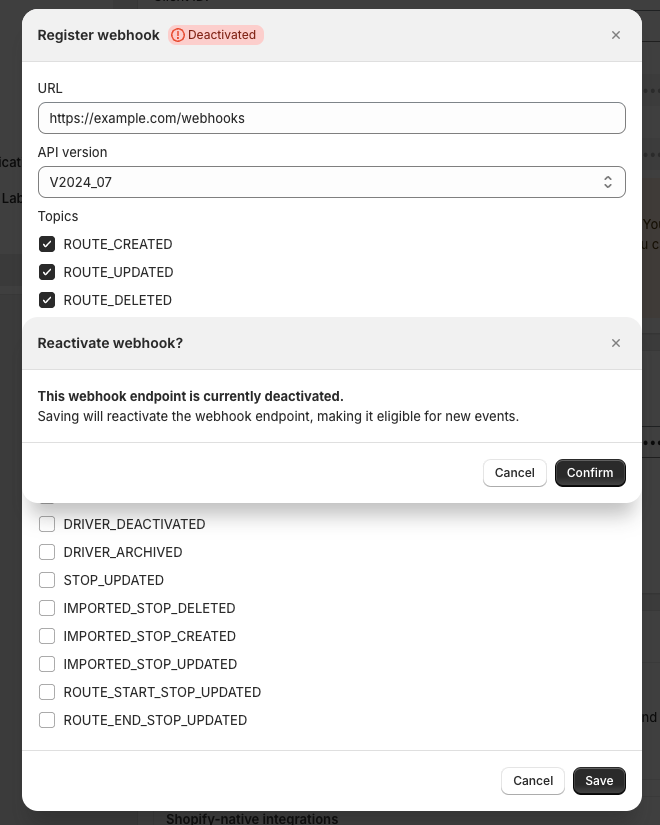
Webhook endpoints that consistently fail to acknowledge events (return 2xx response within 10 seconds) may be deemed inactive and be deactivated by our system. Deactivated webhooks are highlighted with a badge on the API settings page:
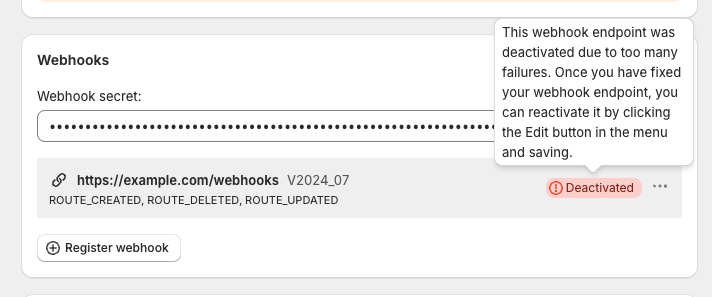
To reactivate a deactivated webhook, just edit and save the webhook endpoint. However, if it continues to fail, it may be deactivated again in the future.