
Getting Started
Generate API credentials, authenticate, and make your first EasyRoutes API call.
This guide walks you through getting API access, authenticating, and making your first API call. By the end, you'll have retrieved your routes via the API.
What you'll need:
- An active EasyRoutes paid plan (Shopify or Web)
- Admin access to EasyRoutes settings
- A way to make HTTP requests (terminal, Postman, etc.)
Set up API client ID and secret key
API access is included with every EasyRoutes paid plan. To generate your credentials:
- Go to Settings > API and add a developer contact email.

- Click Generate API Key.
You'll receive two values:
| Credential | Description |
|---|---|
Client ID | Always visible in settings. Identifies your account. |
Secret key | Shown only once. Copy and store it securely. |
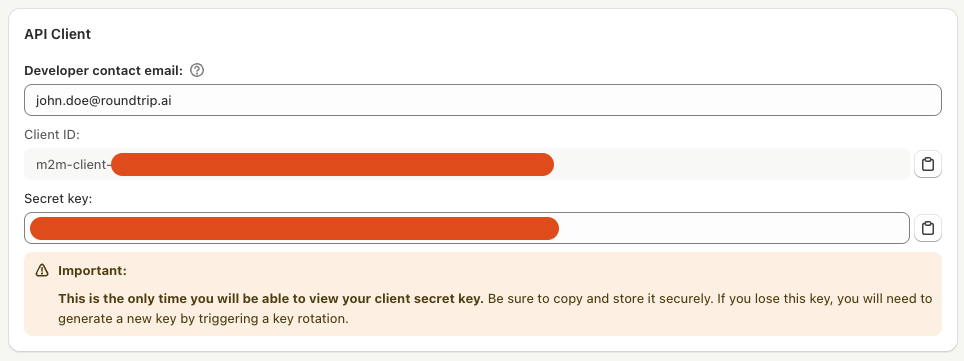
Note: the Secret key is only available immediately after it is generated. The secret key should be copied and stored in a secure location. If you lose your secret key, you'll need to rotate it (see Rotating secrets below).
Authenticating and making requests
See our EasyRoutes API Reference for full API documentation.
To get started, exchange your client ID and secret key for a short-lived access token using the /authenticate endpoint. Replace the placeholder values with the credentials you generated in Settings > API.
curl -X POST \
  -H "Content-Type: application/json" \
  -d '{
    "clientId": "your-client-id",
    "clientSecret": "your-secret-key"
  }' \
  https://easyroutes.roundtrip.ai/api/2024-07/authenticate
The response includes an access token and its lifetime:
{
  "accessToken": "eyJ...",
  "expiresInSeconds": "3600",
  "organization": "your-organization"
}
Copy the accessToken value into an environment variable before making authenticated requests:
export EASYROUTES_ACCESS_TOKEN="paste-access-token-here"expiresInSeconds tells you how long the access token remains valid. Cache the token and authenticate again before it expires.
Refer to Authenticate API for details.
Rotating secrets
Forgot your secret key? If you have forgotten your secret key, you can initiate a key rotation to generate a new one. During the rotation, both the old key and the newly generated one will be valid for API authentication.
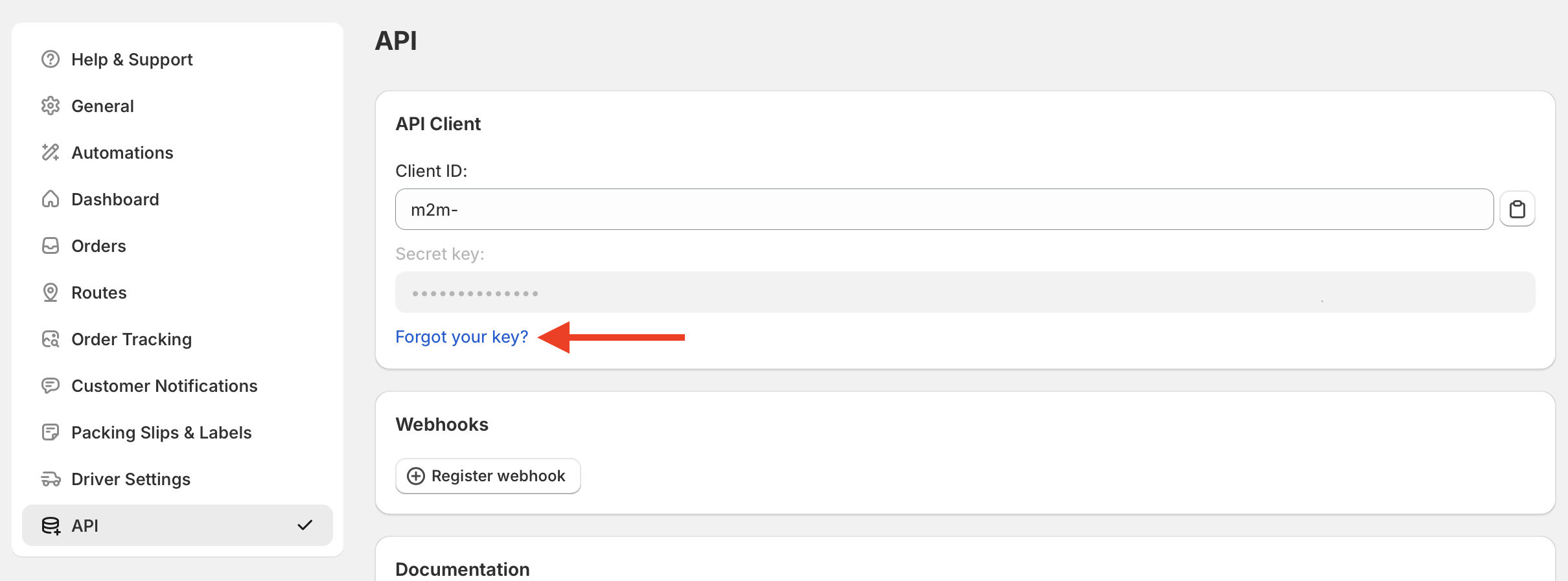
Once again, the new secret key is only viewable immediately after you generate it. Please copy and store it in a secure location before completing the rotation! Once you have migrated clients to the new key, click the Finish rotation button to disable the old key. You can also cancel the rotation at any time to disable the new key instead.
Make your first API call
Use the access token to retrieve a list of recent routes:
curl -sS -H "Authorization: Bearer $EASYROUTES_ACCESS_TOKEN" \
    'https://easyroutes.roundtrip.ai/api/2024-07/routes?query.sortKey=UPDATED_AT&query.limit=10'
What's next?
Now that you're authenticated, here's what you can do:
| Goal | API |
|---|---|
| Import orders from external systems | ImportStops endpoint |
| Get notified when deliveries complete | Webhooks API |
| Access stop-level data (POD, status, etc.) | ListRoutes or GetRoute endpoints |
| Connect to Zapier without code | Zapier integration |
Documentation
Now that you have set up your initial API access, learn more about our API below and view our docs:
- Developer Overview - this guide provides a high-level overview to help you get started building integrations with EasyRoutes as a developer.
- API Reference Guide - learn how to add stops into EasyRoutes for route planning and access route and stop data
- Webhooks Guide - learn how to use our webhooks to react to real-time changes in routes and stops for integrations or connect with Zapier to integrate with no-code workflows
Zapier Integrations
You can use our API with Zapier to unlock seamless no-code workflows with your favorite apps and services, triggered by route updates in EasyRoutes or by stops imported from your own data sources.
- Import Stops Action - You can Import stops into EasyRoutes for planning with our Import Stop action on Zapier.
- Integrate with route- and stop-level updates with our Route Updated & Stop Status Updated Zapier triggers.
- Design custom workflows to suit your specific needs - see our Common Zapier Integrations support article for examples and workflows.